

Hello CS2 traders! Welcome to our weekly bonus blog!
where you'll find the latest and most comprehensive UUSKINS Gift Points Codes for this week. We update this page weekly to bring you extra Gift Points. As long as your order meets the corresponding amount, you can use the codes below to redeem points and exchange them for your favorite CS2 skins in the store!
🔥 Extra Tip: Want to get extra Gift Points on your next CS2 skin purchase? Visit UUSKINS!
Shop smart and buy CS2 skins safely at UUSKINS
• Skin marketplace with 2M+ listings.
• Premium skin trading services tailored just for you.
• Lightning-fast delivery with no game interruptions.
• Trusted by thousands of players worldwide.
• 100% secure transactions to protect your inventory.
Valid UUSKINS Codes This Week (Valid until July 19)
※ Note: The following codes require meeting the corresponding minimum spending threshold. Quantities are limited, first come, first served!
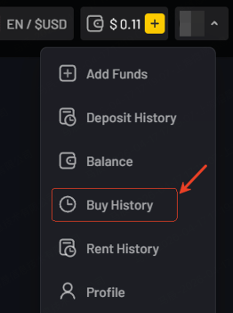
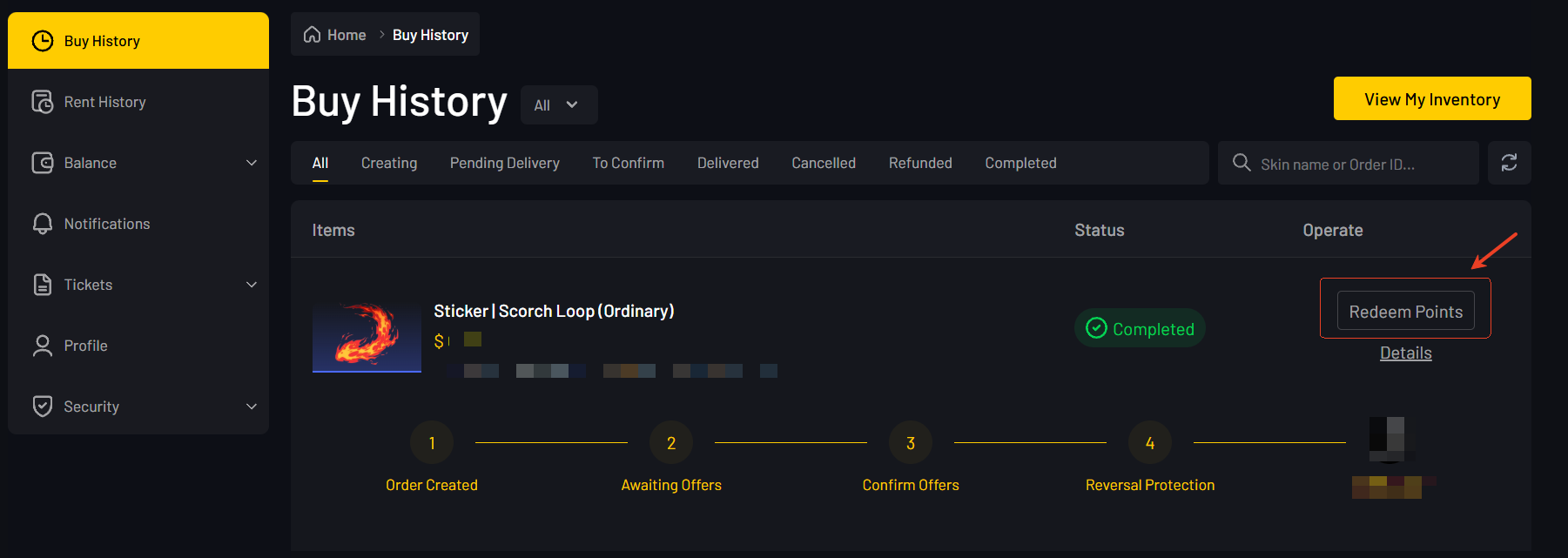
※ Official Redemption Page: Click your avatar in the top right corner – Buy History – Find an order that meets the amount criteria and click Redeem Codes in the top right corner.
Here are the 4 valid UUSKINS codes for this week (July 13 - July 19):
• UUSKINS-3DUU-44C Spend $30 or more to redeem, get 50 extra Gift Points
• UUSKINS-Y58V-VPK Spend $100 or more to redeem, get 100 extra Gift Points
• UUSKINS-U3N4-ZND Spend $300 or more to redeem, get 300 extra Gift Points
• UUSKINS-HZ29-5NM Spend $1000 or more to redeem, get 1000 extra Gift Points
(⚠️ Tip: If it says the code is invalid, it means the code has been fully redeemed by other players or has expired. Stay tuned for our update next week!)
How to Redeem UUSKINS Codes
To redeem a code on UUSKINS, you need to have a registered account and complete a skin purchase that meets the threshold.
Detailed Steps to Redeem Codes
Step 1: Log in to your account on the UUSKINS official website.
Step 2: Complete a skin purchase that meets the minimum spending requirement of the code above (e.g., $30 or more).
Step 3: Click your avatar in the top right corner, then click Buy History.
Step 4: Find the order that meets the minimum spending amount of the code in the order list, and click the Redeem Code button in the top right corner of the order.
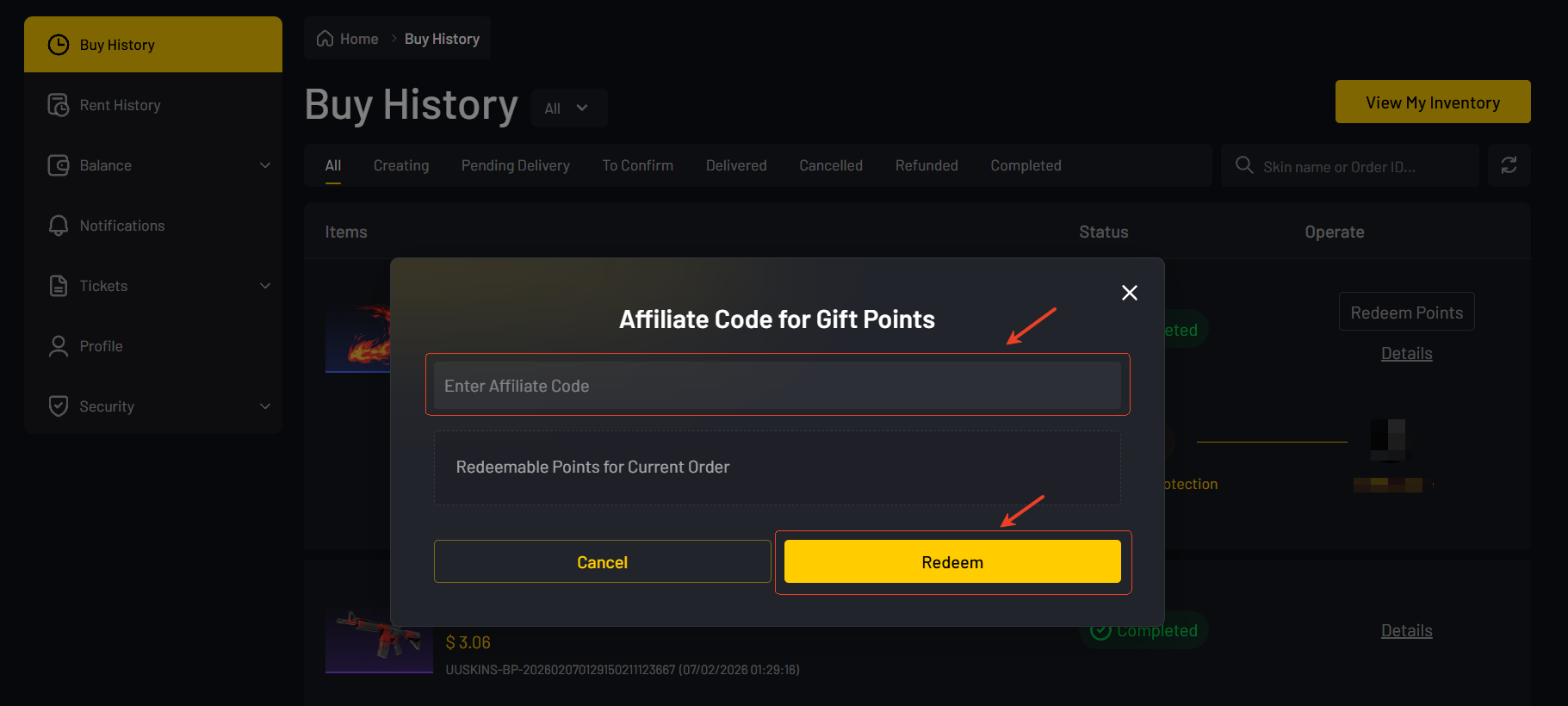
Step 5: Enter the corresponding code provided above and click Redeem. You will immediately receive the extra Gift Points in your account balance! (Note: The order itself automatically earns base points; entering the Code is to get the extra stacked bonus.)
How to Get More Gift Points on UUSKINS?
Gift Points are exclusive points on the UUSKINS website that can be used directly to redeem CS2 skins. Besides grabbing weekly codes for extra points, here are a few ways to steadily earn points:
1. Ways to Get Free Points
• Daily Website Check-in: Log in to the UUSKINS website daily and complete the check-in to claim free Gift Points. Consecutive check-ins yield richer rewards!
• Invite Friends: Invite new users to register and make purchases through your exclusive referral link, and both you and your friends will receive generous Gift Points rewards.
2. Automatic Points Cashback on Purchases
In addition to public codes, every purchase you make on UUSKINS automatically earns you exclusive rewards!
• Buy Any CS2 Skin - After each completed order, the corresponding base Gift Points will be automatically issued to your account balance, without any manual redemption required.
• Extra Bonus - Only the extra bonus Codes released weekly require you to go to your Buy History to manually enter and redeem.
a. Advantages of Using UUSKINS
When it comes to CS2 skin trading, UUSKINS offers several compelling advantages that make it stand out:
• Wide Selection: Skin marketplace with 2M+ listings.
• Affordable: Highly competitive prices. UUSKINS prices are closely monitored to ensure we offer the most competitive rates in the market. Spend less, get the skins you want!
• Fast: Lightning-fast delivery. We always pride ourselves on our fast delivery service. Our streamlined process ensures you receive your skins quickly, allowing you to show them off in-game with minimal interruption.
• Secure: 100% secure transactions. Security is UUSKINS' top priority. All transactions are completed through secure channels, so you can rest assured that your Steam account and inventory are safe.
b. How to Buy Skins on UUSKINS
To buy skins on UUSKINS, please follow these steps:
1. Go to the UUSKINS official website (uuskins.com) and log in via Steam.
2. Browse the market and find the CS2 skins you want to buy.
3. Add the items to your cart and proceed to checkout.
4. Choose your preferred payment method, then click the "Pay Now" button to complete the payment.
5. Accept the trade offer on Steam to receive your skins, and the base points will automatically arrive in your account. Don't forget to go to Buy History to redeem this week's extra Code!
© UUSKINS — Shop smart and buy CS2 skins safely.